
TikTok PFP Downloader – Save Any Profile Picture in Seconds
A simple guide to downloading TikTok profile pictures the right way — faster and cleaner than a screenshot, with no login needed.
TikTok profile pictures are often tiny inside the app, and trying to screenshot one usually leaves you with a cropped, low-quality image surrounded by parts of the interface you didn't want. If you've ever tried to save someone's profile photo and ended up with a blurry, awkwardly cropped result, a TikTok PFP downloader solves that exact problem — it pulls the image itself rather than a screenshot of your screen, which means a cleaner, more usable result in far fewer steps.
How to Download a TikTok Profile Picture in Full Size?
The process is more straightforward than most people expect. It generally works like this:
- Find the public TikTok profile whose picture you want to save.
- Copy the profile's username or link.
- Open a TikTok profile picture downloader.
- Paste the profile information into the tool.
- Let the tool process the profile.
- Preview the image that's returned.
- Save it to your device.
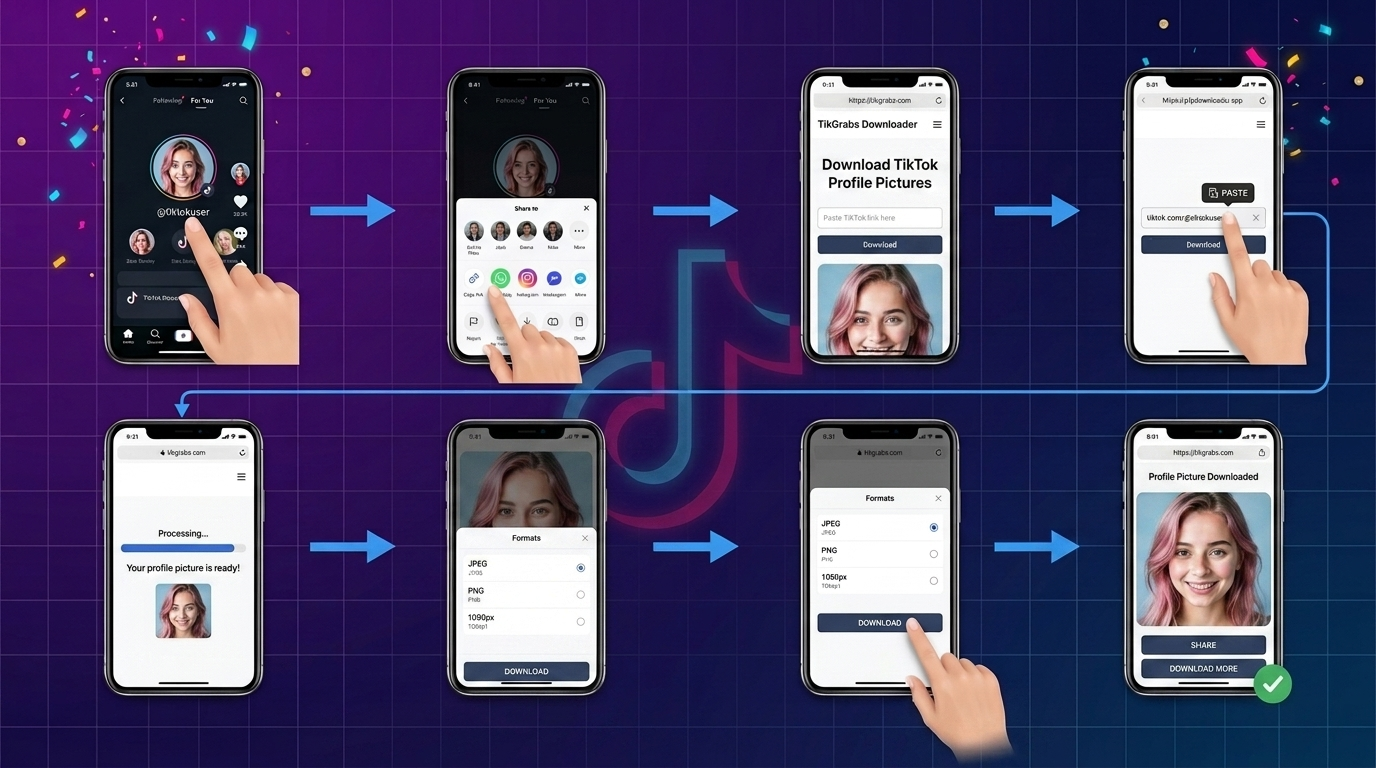
That's the entire workflow. There's no editing software involved, and no need to manually crop out the surrounding app interface the way you would with a screenshot.
Why Use a TikTok PFP Downloader Instead of a Screenshot?
A screenshot captures your entire screen, not just the picture. You end up with menu bars, icons, and whatever else was on display, and then you're stuck cropping it down — usually losing resolution in the process since you're zooming into a small section of an already-compressed screen capture.
A dedicated downloader skips all of that. It retrieves the profile image directly, so what you get is just the picture, without needing to trim anything afterward. The result tends to be more consistent too — you're not relying on your own cropping accuracy every time.
Download Any TikTok Profile Picture Instantly – Full HD, No Login
Most people looking for this kind of tool want the same three things: speed, no unnecessary sign-up, and a clean image at the end. A well-built downloader delivers on all three — you paste a profile link, get a preview almost immediately, and save the file without creating an account first.
It's worth being realistic about image quality here. The resolution you get back depends on the size of the picture the original account uploaded and what the tool is able to retrieve — a downloader can't manufacture detail that wasn't in the source image to begin with. What it can do is avoid losing quality along the way, which is the main advantage over a screenshot.
If you want to try this process yourself, TikGrabs offers a straightforward TikTok profile picture downloader that follows exactly this workflow — paste a profile, preview the image, save it.
The Fastest Way to Download a TikTok Profile Picture
If speed is the priority, the fastest route cuts out every unnecessary step. Copy the profile link, paste it into a downloader built for this specific task, preview what comes back, and save. Compare that to the screenshot method — open the profile, take a screenshot, switch to a photo editor, crop it manually, and hope the result isn't too pixelated. The downloader route is shorter by several steps and doesn't require any editing skill.
Can You Really Download a TikTok Profile Picture in Full Size?
This depends on what "full size" actually means in practice. It doesn't mean every profile picture can be pulled at some fixed maximum resolution — it means the tool retrieves the image at the size the platform makes available for that particular profile. Some accounts have higher-resolution pictures uploaded than others, and the downloader can only work with what exists. So while a good tool avoids adding extra compression or quality loss during the download itself, it can't upgrade a small or low-resolution source image into something sharper than the original.
Does a TikTok PFP Downloader Need Your TikTok Login?
It shouldn't. Downloading a public profile picture is a simple request for publicly visible information, and that doesn't require handing over your TikTok username and password to a third-party tool. If you come across a downloader asking for your login credentials just to save an image, treat that as a red flag rather than a normal part of the process. A properly built tool only needs the profile you're looking up — nothing about your own account.
Can You Download a TikTok PFP on Mobile?
Yes, and for most users this is actually how they'll use it. On both Android and iPhone, you can open a browser-based downloader directly, paste the profile link, and save the resulting image to your camera roll or downloads folder like any other photo. There's no app installation required if the tool works through a mobile browser. Once saved, the image typically lands in your phone's default Photos or Gallery app, or in a Downloads folder if you're using certain Android browsers. The process is essentially identical to the desktop version, just adapted to a smaller screen.
What Makes a TikTok Profile Picture Downloader Reliable?
A few practical signs separate a genuinely useful tool from a frustrating one. Look for a simple interface that doesn't bury the actual function behind ads or confusing steps. Processing should be reasonably quick, and the tool shouldn't ask for account credentials it has no real need for. It should also work cleanly on both desktop and mobile, since plenty of people will be doing this from a phone. No tool can honestly claim to be "100% guaranteed" or completely risk-free — but transparency about how it works, and a workflow that doesn't demand more information than necessary, are reasonable things to expect.
Using Downloaded Profile Pictures Responsibly
A profile picture belongs to the person who uploaded it, even once it's saved to your device. Downloading a public image for personal reference is different from redistributing it, using it commercially, or presenting it as your own. Respecting privacy and copyright matters here — if you're saving someone's picture, keep the use personal and non-commercial unless you have their permission otherwise. This isn't complicated, but it's worth keeping in mind every time you use a tool like this.
Beyond profile pictures, TikGrabs also maintains a broader set of TikTok download tools for people who regularly need to save content from the platform.
Frequently Asked Questions
Can I download a TikTok profile picture in full size?
You can download it at the resolution the platform makes available for that profile — the tool retrieves the image without adding extra compression, but it can't exceed the quality of the original upload.
Is a TikTok PFP downloader free to use?
Most browser-based tools for this purpose are free, since the process is simple and doesn't require heavy processing.
Can I download a TikTok profile picture without logging in?
Yes. Saving a public profile picture shouldn't require you to log into your own TikTok account.
Can I download a TikTok PFP on iPhone?
Yes, through a mobile browser. Paste the profile link, preview the image, and save it directly to your Photos app.
Can I download a TikTok profile picture on Android?
Yes, the process works the same way through a mobile browser, with the saved image landing in your Gallery or Downloads folder depending on your device.
Why does my downloaded profile picture look blurry?
This usually means the original picture was uploaded at a low resolution to begin with. A downloader can't add detail that wasn't in the source image.
Is it okay to download someone else's TikTok profile picture?
Saving a public image for personal reference is generally fine, but redistributing it, using it commercially, or presenting it as your own isn't appropriate without the owner's permission.
Conclusion
A dedicated TikTok PFP downloader makes saving a public profile picture faster and cleaner than screenshotting and cropping it yourself, though the final image quality always depends on what the original account uploaded. For anyone who regularly needs to save profile pictures without dealing with app interfaces or blurry crops, a tool built specifically for this task is the more practical option.
Related posts

Ready to download?
Paste a public TikTok link and save a clean MP4, MP3, story, or slideshow.
Open video downloader